Structured data for ChatGPT and AI systems (JSON-LD)
The module automatically generates and manages complete structured data (schema.org) for the entire store, organizing information about products, content, and the company in a way that is understandable for AI systems and search engines. As a result, the store is interpreted unambiguously by algorithms, which increases its visibility, credibility, and readiness for AI-powered search.
Table of contents
- Enabling the module in the admin panel
- schema.org data displayed in the store
- How to check the data in your store?
Enabling the module in the admin panel
In the admin panel, select Applications → Structured data 
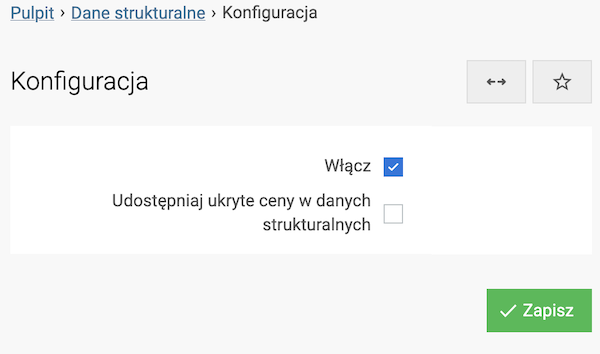
Enabling the module displays structured data on the store pages.
The Include hidden prices in structured data option is disabled by default. When enabled, product prices are included in the structured data even if they are not displayed directly on the store pages. This feature is useful when prices are hidden in the store for reasons other than the need to exclude them entirely from publicly available data.
Schema.org data displayed in the store
Organization
Structured data @type: "Organization" is generated mainly based on the Store information and Open Graph modules, which ensures consistency of key company information across the entire store. This block clearly defines who owns the store, how they can be contacted, and what brand they represent - primarily for AI systems, as well as for search engines.
- @type: "Organization": Specifies that the described object is a company or organization operating the online store, constituting the main business entity of the entire service.
- @id: A unique identifier of the organization within the page, used to link data between different schemas (e.g. Product, WebSite, WebPage). It allows AI systems and search engines to clearly recognize that all data refers to the same entity.
- name: The official name of the company or store under which the brand is recognized by users, AI systems, and search engines. The value is taken from the Store information module, from the Seller name / Company field. Filling in this field is a condition for generating the Organization schema.
- description: A short description of the company’s business activity, informing what the store does and what offer it presents. The description is taken from the Open Graph module, from the Store promotional description field. If this field is not filled in, the system uses the description from the Positioning → Meta tags module (the Description field).
- url: The main, canonical address of the store website, treated as the official page of the organization. The value is taken automatically based on the store address.
- sameAs: Official addresses of the brand’s social media profiles, used by AI systems to confirm the organization’s identity and connect information about the store coming from different sources. Thanks to this, AI better recognizes the brand as one coherent entity, and search engines can correctly present related communication channels. It is based on the Social links module.
- email: The company’s contact e-mail address, used as an official communication channel. Taken from the Store information module, from the Contact e-mail address field.
- foundingDate: The year the company was founded, building credibility and the brand’s history. The information is taken from the Store information module, from the Year founded field.
- contactPoint: Contact data intended for store customers:
- telephone: Customer service phone number, taken from the Store information module, from the Phone field.
- contactType: Type of contact, set permanently as customer support, in accordance with schema.org recommendations.
- areaServed: Countries or areas where the store operates. The information is taken based on active delivery zones in the cart. The data is presented as two-letter country codes compliant with the ISO 3166-1 alpha-2 standard.
- availableLanguage: Languages in which the store’s customer service is available. The information is determined based on active store language versions. The data is presented as English language names, in accordance with schema.org requirements.
- address: The physical address of the company headquarters, taken from the Store information module.
- streetAddress: Street and number.
- addressLocality: City.
- postalCode: Postal code.
- addressCountry: Country, presented as a two-letter ISO 3166-1 alpha-2 code.
- logo: The company’s official logo, used in structured data and by AI systems and search engines. The logo is taken from the Open Graph module, from the Store promotional image field. If this field is not filled in, the system automatically uses the logo from the graphic configuration of the selected store theme.
- url: The address of the logo image file.
- width: The width of the logo in pixels.
- height: The height of the logo in pixels.
WebSite
Structured data @type: "WebSite" describes the entire service as one coherent website to which all store subpages belong. This block allows AI systems to understand the structure of the service as a whole and clearly connect it with the website owner, and is then used by search engines for correct interpretation of the website.
- @type: "WebSite": Specifies that the described object represents the entire store website as one coherent service.
- @id: A unique identifier of the service, used to link WebSite with other schemas (e.g. WebPage). It enables AI systems to clearly recognize that all pages belong to one service.
- url: The main, canonical address of the store website, treated as a reference point for the entire service. The value is taken automatically based on the store address.
- name: The name of the service under which the website is identified by AI systems and presented in the context of the entire site. The value is taken from the Store information module, from the Seller name / Company field.
- publisher: A link between the website and its owner (Organization). This information indicates to AI systems and search engines who is responsible for the published content.
WebPage
Structured data @type: "WebPage" describes a specific store subpage, e.g. a product page, category, or informational page. This block allows AI systems to understand exactly what a given page is about and what role it plays in the entire service, and then enables search engines to index and present it correctly in search results.
- @type: "WebPage": Specifies that the described object is a single web page belonging to the store service.
- @id: A unique page identifier that enables AI systems to clearly recognize this specific subpage and connect it with other schemas (e.g. Product).
- name: The page title, describing its content in a way understandable for AI systems and users. It corresponds to the page title set in the Positioning tab in the store panel.
- url: The page URL, indicating the exact place of its occurrence in the service structure. The value is taken automatically based on the current page address.
- inLanguage: The language in which the page content is presented. This information allows AI systems to interpret the content correctly linguistically and contextually, and helps search engines match the page to users. The value is taken based on the currently selected store language.
- isPartOf: A link between the page and the parent service (WebSite), thanks to which AI systems understand that the page is part of a larger whole.
- publisher: Indicates the organization (Organization) that publishes and is responsible for the page content, which increases the credibility of information for AI systems and search engines.
- description: A short description of the page content, summarizing its topic and value. This description is used by AI systems to understand the page context and by search engines when presenting results. It is taken from the page description in Positioning (meta description).
- primaryImageOfPage: Specifies the main product image (ImageObject). This element is added to the product page.
BreadcrumbList
Structured data @type: "BreadcrumbList" describes the navigation path leading to the current page, e.g. from the homepage through the category to a specific product. This block allows AI systems to understand the page context in the store structure and the relationships between individual levels of the offer, and enables search engines to correctly present navigation in search results.
- @type: "BreadcrumbList": Specifies that the described object is a list of navigation elements (so-called breadcrumbs), presenting the page hierarchy within the store.
- @id: A unique identifier of the navigation path associated with a specific page. It enables AI systems to clearly connect the breadcrumb with a given subpage and other schemas.
- itemListElement: A list of successive navigation elements, ordered from the general level to the most detailed. Each element describes one step in the store structure:
- @type: "ListItem": Specifies a single element of the navigation path.
- position: The position of the element in the navigation order, starting from
1. This order is crucial for AI systems to correctly understand the page hierarchy. - name: The name of a given navigation level, presented to users and used by AI systems to describe the store structure. It is taken from the store navigation system.
- item: The URL of the page corresponding to a given navigation level. It allows AI systems and search engines to connect the name with a specific subpage. It is taken from the store navigation system.
ItemList
Structured data @type: "ItemList" describes a list of products displayed on the page, e.g. in a category, manufacturer list, or group. This block allows AI systems to understand that the page presents a set of related products in a specific order, and enables search engines to correctly interpret and index product lists.
- @type: "ItemList": Specifies that the described object is a list of items (products) displayed on the store page.
- @id: A unique identifier of the product list associated with a given page (e.g. category). It allows AI systems to clearly recognize the list as a separate logical entity and connect it with other schemas.
- itemListElement: A list of elements on the page, ordered in the same sequence in which the products are presented to the user. Each list element describes one product:
- @type: "ListItem": Specifies a single list element.
- position: The product position in the list, starting from
1. This order is important for AI systems when analyzing the layout and hierarchy of presented products. - item: An object of type Product, containing a full description of a specific product (including name, URL, price, availability, and brand). Thanks to this, AI systems can analyze products both as list elements and as independent entities.
- numberOfItems: The total number of products on the viewed list. This information helps AI systems and search engines understand the scale of the presented offer.
Product
Structured data @type: "Product" describes a single product offered in the store. This block allows AI systems to clearly understand what a given product is, how to identify it, and under what conditions it is sold, and enables search engines to correctly index product offers.
- @type: "Product": Specifies that the described object is a product offered for sale.
- @id: A unique product identifier, allowing AI systems to clearly recognize the same product across all schemas (e.g. Review, Offer, ItemList).
- name: The product name displayed to users and analyzed by AI systems for offer identification.
- image: Product images, used by AI systems for visual offer identification and by search engines in rich results.
- sku: The internal product identifier in the store, enabling clear linking of the offer with the sales system. In the system, this is the product code.
- gtin: The global product identification number (e.g. EAN-13). This is one of the strongest identifiers used by AI systems and search engines to compare offers for the same product. In the system, this is the manufacturer code. It is displayed if filled in.
- mpn: The Manufacturer Part Number. It helps AI systems and search engines clearly identify the product against other offers. In the system, this is the MPN code. It is displayed if filled in.
- mainEntityOfPage: A link between the product and its page (WebPage), clearly indicating that the given subpage is the main place where the product is presented.
- description: The product description, used by AI systems to understand its features and value and by search engines to analyze page content.
- category: The product category, helping AI systems classify the offer better in the store structure.
- brand: The product brand, enabling AI systems to connect offers from the same manufacturer.
- offers: Commercial information regarding the product sale:
- name / url Product name and URL for sale
- price: Gross price of the product.
- priceCurrency: Price currency.
- availability: Product availability. Determined based on Google Shopping configuration
- sku / mpn / gtin: Product identifiers at the offer level, used for precise offer matching in AI systems and search engines.
- priceValidUntil: Specifies the validity date of the given price. The value is a date 14 days from the current time.
- seller: The Organization selling the product.
Reviews (Review + AggregateRating)
Structured data aggregateRating and review are part of the @type: Product" schema and describe customer ratings and reviews visible on the product page. Thanks to them, AI systems can better assess the quality and credibility of the product based on real reviews, and search engines can correctly interpret ratings and present them in results.
aggregateRating
- @type: "AggregateRating": Specifies that the object contains the aggregate rating of the product, constituting a summary of all reviews of a given language version assigned to the given product.
- ratingValue: The average product rating calculated based on all reviews. It helps AI systems assess the quality of the offer and compare products.
- reviewCount: The number of reviews included in the average rating. It helps AI systems assess the credibility of the result (e.g. a high rating supported by many reviews).
review
- @type: "Review": Specifies that the object describes a single user review directly assigned to the product.
- reviewBody: The review content written by the customer. The most important element for AI systems because it contains a natural description of experiences with the product.
- reviewRating: A numerical rating assigned to the review:
- @type: "Rating": The type of the rating object.
- ratingValue: The rating given by the user.
- bestRating: The highest possible rating (in our store system
5). - worstRating: The lowest possible rating (in our store system
1).
- author: Review author:
- @type: "Person": Specifies that the author of the review is a person.
- name: The name or designation of the review author. If user data is missing, the value Anonymous is used.
- datePublished: The publication date of the review, allowing AI systems to assess how current the review is.
- inLanguage: The language in which the review was written. It helps AI systems interpret content in multilingual stores. The value is taken based on the language in which the review was added.
- itemReviewed: A link between the review and a specific product (Product), thanks to which AI systems clearly know what the review concerns.
FAQPage
Structured data @type: "FAQPage" describes the questions and answers section displayed directly on the product page. Thanks to this, AI systems can clearly understand the most common customer questions regarding the product, and search engines can present ready-made answers directly in search results. These data are generated automatically based on information entered in the Product FAQ module.
- @type: "FAQPage": Specifies that the object represents a page or section containing questions and answers (FAQ) assigned to the product.
- @id: A unique identifier of the FAQ section associated with the product page. It enables AI systems to clearly recognize this data block.
- mainEntityOfPage: Indicates the page (WebPage), that is, the product page to which the FAQ section is assigned. Thanks to this, AI systems know that the questions concern a specific offer.
- inLanguage: The language in which the questions and answers are written. It allows AI systems to correctly interpret content in multilingual stores. The value is taken based on the language in which the customer question was asked.
- mainEntity: A list of questions and answers displayed on the product page:
- @type: "Question": Specifies a single question asked by customers regarding the product.
- name: The content of the question, formulated in a natural and understandable way. This is a key element for AI systems analyzing user intent.
- acceptedAnswer: The official answer assigned to the question:
- @type: "Answer": Specifies that the object is an answer to a question.
- text: The answer content visible on the product page, used by AI systems to generate direct answers and by search engines in rich results.
ImageObject
Structured data with @type: "ImageObject" describes the main product image. It allows search engines and AI systems to identify which image best represents the product. This information is included on product pages.
- @type: "ImageObject": Specifies that the object represents the main product image.
- @id: A unique image identifier that allows the object to be clearly identified and referenced in other structured data blocks within WebPage.
- url: The URL of the main product image.
BlogPosting
Structured data @type: "BlogPosting" describes a single blog post published in the store. Thanks to this, AI systems can correctly understand the article content, its topic, freshness, and connection with the brand, and search engines can better index the post and present it in rich search results.
- @type: "BlogPosting": Specifies that the object represents a single blog post or article published within the store.
- headline: The title of the blog post, directly describing the topic of the article. This is key information for AI systems analyzing the content and for search engines displaying the headline in search results.
- description: A short description or summary of the post, used by AI systems to understand the context of the article and by search engines as a description in search results. The hierarchy for retrieving the description from post editing is as follows:
- Header description
- List description
- Shortened post content
- datePublished: The publication date and time of the post. This information allows AI systems and search engines to assess content freshness.
- dateModified: The date and time of the last modification of the post. It indicates whether the content has been updated, which increases its credibility.
- isPartOf: A link between the blog post and the parent service (WebSite), thanks to which AI systems understand that the article is part of a blog run within the store.
- image: The main image of the blog post, representing the article content. Used by AI systems for visual analysis and by search engines in previews and rich results.
- @type: "ImageObject": Specifies that the object is an image.
- url: The address of the image file assigned to the post.
- url: The direct URL of the blog post, indicating its location in the store structure.
- publisher: Indicates the organization (Organization) responsible for publishing the post, which strengthens the credibility of the content for AI systems and search engines.
How to check the data in your store?
The schema.org structured data generated by the module is saved in JSON-LD format and placed directly in the source code of the store page.
It is not visible to users, but it can be read by AI systems and search engines.
To see it, simply view the page source (e.g. Ctrl + U - Cmd + U (MAC)) and search for the fragment application/ld+json.
The following tools are recommended for checking the correctness of structured data:
- Schema.org Validator - shows whether the code is semantically correct. A tool for full validation of all schema.org data.
- Google Rich Results Test - shows whether Google can display so-called rich snippets. It allows you to check which structured data elements can be used by Google (e.g. products, reviews, FAQ).