Corrective invoices in SOTESHOP AI
In SOTESHOP AI, we have added the ability to issue corrective invoices directly from the store's admin panel. The new feature allows you to correct customer details, products, prices, quantities, and VAT rates. The system automatically calculates the differences and enables corrective invoices to be submitted to KSeF. With this update, you can issue sales invoices and their corrections in one place, without additional integrations.
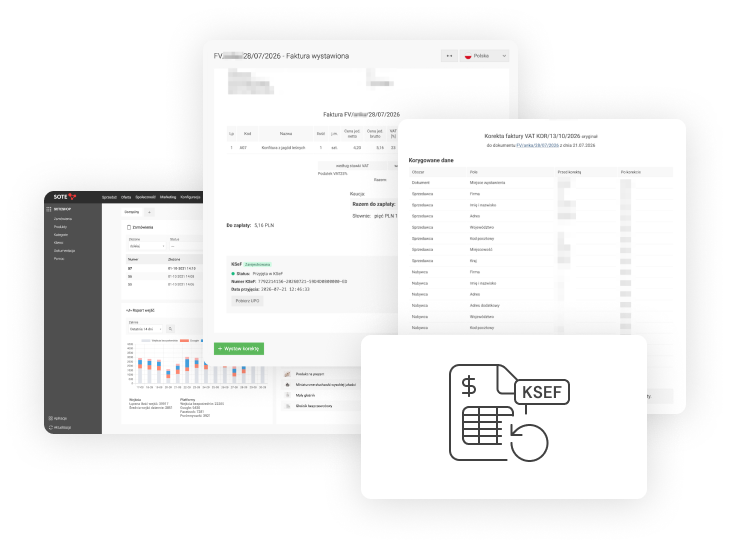
Issuing corrective invoices
A corrective invoice can be issued based on a previously issued invoice. The system automatically links both documents, preserving the history of changes.
Corrections can include both formal details and invoice items.
You can correct:
- Customer details - company name, address, and other information.
- Invoice details - dates and other formal information.
- Products - names, codes, quantities, and prices.
- VAT rates and GTU codes - changes related to taxes and product classification.
- Invoice items - add a missing product or remove an incorrect item.
A single corrective invoice can include several types of changes at once, such as correcting customer details and changing a product price.
Automatic calculation of corrections
SOTESHOP AI automatically calculates differences in net amounts, VAT, and gross amounts. It handles both additional payments and refunds, including cases involving different VAT rates.
Before issuing the document, you can review the values before correction, the changes made, and the values after correction.
Submitting corrective invoices to KSeF
Corrective invoices can be submitted to the Polish National e-Invoicing System (KSeF) directly from the store's admin panel.
Corrective invoices are displayed in the same list as issued invoices, clearly marked and linked to their original documents.
Summary
The addition of corrective invoices extends the capabilities of the SOTESHOP AI invoicing module. You can now issue sales invoices, correct them, and submit them to KSeF directly from the store's admin panel. This allows you to manage invoices and corrections in one place, without the need for additional invoicing software.
Update
Updates are included as standard for all SOTESHOP AI 8 stores with SOTESHOP AI Start, Standard, PRO, or VIP subscription plans. Check the store update documentation: Update documentation
Create your SOTESHOP AI online store free for 14 days.
Related pages
Recommended articles on the blog
Two-Factor Authentication (2FA) for SOTESHOP AI Store Customers
SOTESHOP AI 8.4.3 Online Store

New EU Rules for Online Returns from June 19, 2026. Prepare Your Store for the Changes.