How to configure the deposit system in SOTESHOP AI
16/03/2026
The deposit system requires adding a deposit to selected beverage packaging. In an online store, this means properly configuring products and correctly displaying the deposit in the cart and order summary. In SOTESHOP AI, deposit system support is available in the store and product settings. Learn how to configure the deposit system in your store.
Deposit system support in SOTESHOP AI
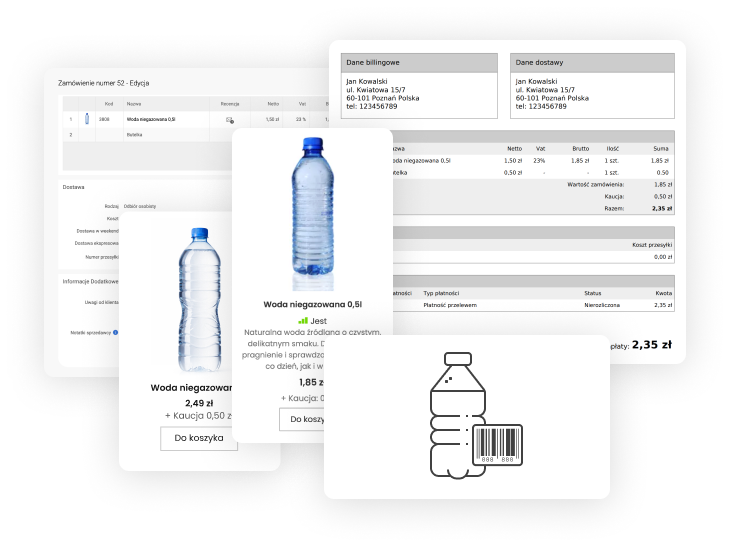
In SOTESHOP AI, you can assign a deposit to products sold in packaging covered by the deposit system. After configuration, the system automatically adds it to the order and displays it to the customer in the cart and order summary.
The deposit is presented as a separate item, so the customer can clearly see which part of the total amount refers to the product and which part refers to the packaging.
Where to configure the deposit system
Configuration is done in the store’s admin panel.
It includes, among others:
- settings related to deposit handling in the store
- assigning deposits to products
- how the deposit is displayed in the cart and order
Why it is worth configuring deposits in your store
Proper configuration allows you to:
- automatically add deposits to orders
- display them separately from the product price
- maintain clarity in the cart and sales documents
This ensures that the store is ready to sell products covered by the deposit system.
Summary
SOTESHOP AI enables deposit system support without additional integrations or store modifications. You only need to configure the appropriate settings and assign deposits to products.
Order SOTESHOP AI – an online store with AI and a deposit system
Order SOTESHOP AI
Related pages
Recommended articles on the blog
17/02/2026
SOTE AI PRO is a service fully integrated with SOTESHOP AI, available directly in the store’s admin panel. Activation is all it takes to launch intelligent search, an AI assistant, and automatic content generation. These are practical tools that support customers’ purchasing decisions, streamline customer service, and help systematically increase sales performance based on real user needs. Everything is ready to use without additional implementations or integrations and works from day one.
13/01/2026
At the beginning of the new year, we would like to remind you about the need to update your store due to the change in the update system.
For all stores that download updates between October 24, 2025 and January 30, 2026, the change will be completely
transparent. We would also like to inform you about changes to the SOTESHOP AI store subscription prices - util February 14, 2026, you can still
renew your license at the lower prices.
18/12/2025
he SOTESHOP online store is changing its name to SOTESHOP AI. This is not just a name change - along with it, we are introducing many new AI features to the store. The first is making AI features available by default, free of charge, for all stores as part of the SOTE AI Start service. Stores already using SOTE AI will receive significantly higher AI credit limits. Additionally, we have introduced features that allow AI systems such as ChatGPT, Gemini, Claude, Perplexity, and many others to recommend products from stores in AI-generated answers. This is a new, free, and modern channel for acquiring new customers. What’s more, every customer using SOTESHOP 8 automatically gets SOTESHOP AI and new capabilities - all you need to do is update your store. It’s a great start to 2026.
01/12/2025
On the final stretch before the holiday rush, we have a gift for our customers in the form of improved AI search. In the new version, the artificial intelligence system helps customers find products even better by suggesting not only products, but also categories and similar phrases. As a result, searching becomes faster, more accurate, and leads to more effective purchases for both new and returning customers.